Confidential commercial notice


This case study contains commercially sensitive work developed for a production product. Selected visuals have been intentionally obscured to respect confidentiality agreements while preserving the overall design process, research and project outcomes.


Additional project details can be discussed during interviews where appropriate.

Confidential commercial notice


This case study contains commercially sensitive work developed for a production product. Selected visuals have been intentionally obscured to respect confidentiality agreements while preserving the overall design process, research and project outcomes.


Additional project details can be discussed during interviews where appropriate.

END-TO-END OWNERSHIP

Commercial Control Panel UX

Commercial Control Panel UX

Commercial Control Panel UX

Leading the end-to-end design of a commercial floor cleaner control panel and operational workflow, from early task analysis through to production-ready specifications.

Leading the end-to-end design of a commercial floor cleaner control panel and operational workflow, from early task analysis through to production-ready specifications.

Role — Researcher & Designer

Methods — User testing, workflow analysis, competitor analysis, prototyping

Duration — 8 weeks

Problem statement

Designing safer interactions for operators

Designing safer interactions for operators

Designing safer interactions for operators

Existing floor-cleaning workflows created opportunities for user error and inefficient machine behaviour. The challenge was to design a control panel and interaction system that reduced operational mistakes while remaining intuitive for experienced cleaners.
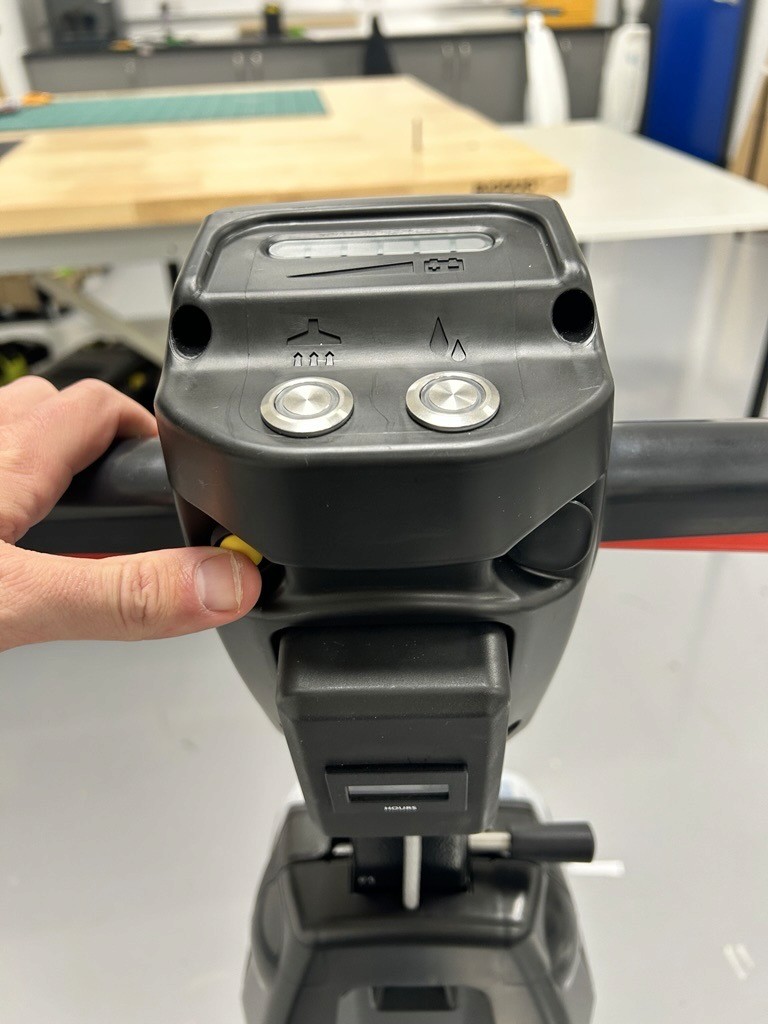
EXISTING FLOOR CLEANER CONTROL PANEL

MY responsibilities

Owning the product experience from research to delivery.

Owning the product experience from research to delivery.

Owning the product experience from research to delivery.

Research

Task analysis & competitor reviews

Research

Task analysis & competitor reviews

Design

UI & workflow design

Design

UI & workflow design

Validation

Prototype testing & usability studies

Validation

Prototype testing & usability studies

Delivery

Final specifications for engineering

Delivery

Final specifications for engineering

UNDERSTANDING EXISTING WORKFLOWS

Mapping operator behaviour and system failures.

Mapping operator behaviour and system failures.

Mapping operator behaviour and system failures.

I mapped existing machine workflows to identify friction points, uncover opportunities to reduce operator error, and establish the interaction requirements for the new control panel.
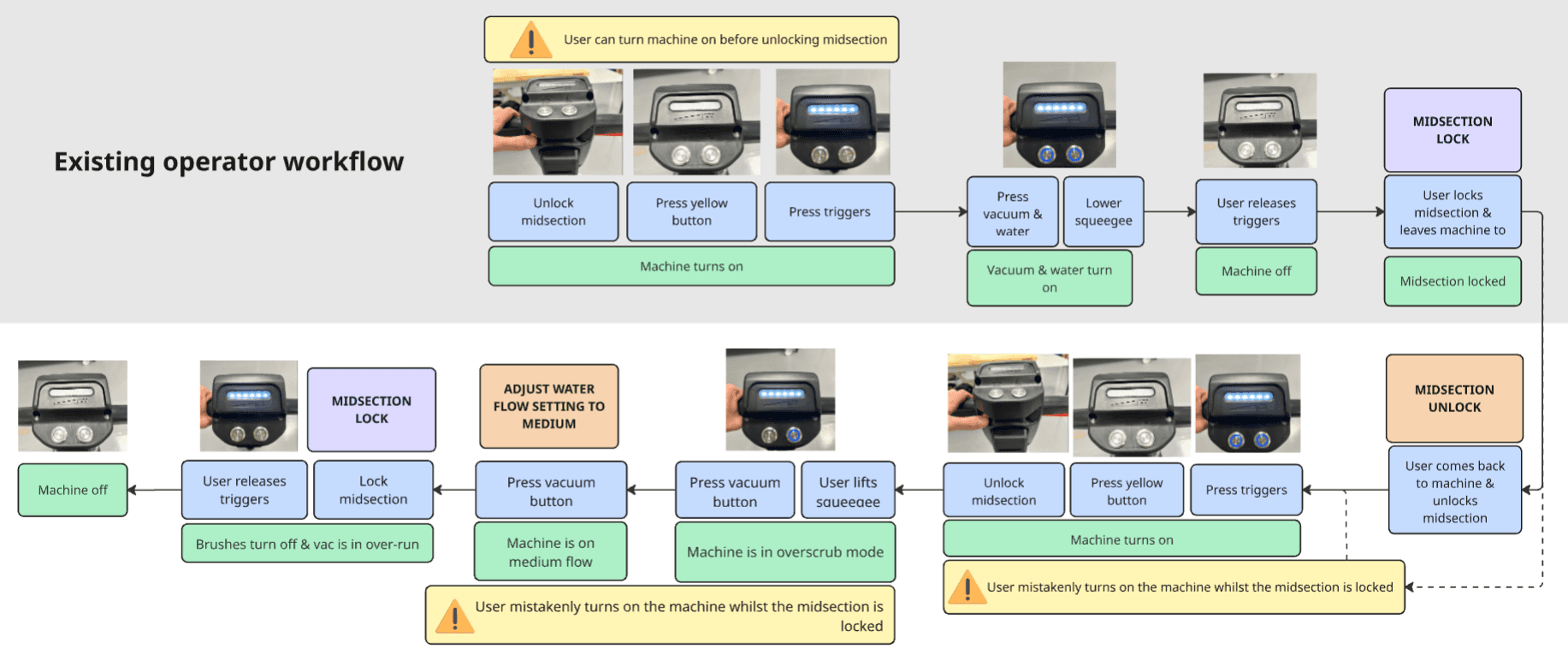
Unsafe interaction states

Users could activate the brushes while the machine was in “parked mode”, creating unnecessary error potential.

Battery inefficiency

The vacuum could remain active while the squeegee was raised, causing avoidable battery drain.

OUTCOME

The workflow analysis established the interaction requirements for a safer and more intuitive control panel.

INTERFACE CONCEPT

Translating insights into an interface.

Translating insights into an interface.

Translating insights into an interface.

This initial concept combined workflow analysis, stakeholder feedback, and insights from previous field research to shape a safer and more intuitive operator experience.

USABILITY TESTING

Evaluating the control panel with operators.

Evaluating the control panel with operators.

Evaluating the control panel with operators.

This usability study gathered early feedback on the control panel, handle controls, and interaction flows. Participants completed predefined tasks using paper prototypes and competitor products to identify areas of friction, confusion, and user error.

Participants

8 participants with moderate floor-cleaning experience.

Operational workflows

Participants completed predefined cleaning workflows based on common operator tasks.

Prototype

Paper prototypes were used to rapidly test interaction flows before development.

Comparison products

Testing included the new concept, the existing machine, and two competitor products.

KEY FINDINGS:

KEY FINDINGS:

KEY FINDINGS:

01

01

Indicator visibility

Indicator visibility

Control panel indicator icons were not clear due to colour and size.

02

02

Button complexity

Button complexity

Excessive button complexity increased user error during operation. All participants pressed the on/off button multiple times and did not identify the + & - buttons.

03

03

Single-button expectations

Single-button expectations

Users expected to cycle through settings using a single-button interaction pattern.

04

04

Control placement

Control placement

Placing primary controls outside the main control panel created confusion and increased operating errors.

These findings informed a series of UI refinements, simplifying interactions and improving system feedback.

Iterative ui refinement

Refining the interface through testing.

Refining the interface through testing.

Refining the interface through testing.

The control panel evolved through multiple iterations, incorporating insights from usability testing and stakeholder feedback.

FINAL INTERFACE

Finalised control panel.

Finalised control panel.

Finalised control panel.

The final interface balanced operator usability, system feedback, and manufacturing constraints before being delivered to the electronics team for implementation.

DESIGN RATIONALE:

DESIGN RATIONALE:

1 - Prioritised controls

Power and water controls were emphasised through size and colour.

2 - Clear system feedback

Indicator icons were grouped within a dark bordered area to improve visibility and system clarity.

3 - Secondary information

The hours meter was intentionally deprioritised, as it is primarily relevant to product owners rather than operators.

Clear visual feedback helps operators quickly understand the machine's current state and reduce uncertainty during operation.

Clear visual feedback helps operators quickly understand the machine’s current state and reduce uncertainty during operation.

workflow refinement

Designing beyond the interface.

Designing beyond the interface.

Designing beyond the interface.

Alongside the UI development, I refined operational workflows to reduce user error and improve key machine interactions. Below are two example workflows developed throughout the project.

Reducing operator error

Introduced new interaction logic that prevented common operating mistakes identified during field research.

Supporting uninterrupted cleaning

Designed a resume workflow that reduced unnecessary restart actions while preserving operator safety.

interactive prototyping

Validating behaviour before implementation.

Validating behaviour before implementation.

Validating behaviour before implementation.

Interactive prototypes were created to validate workflows, communicate system behaviour to stakeholders, and refine interactions before firmware implementation.

What was prototyped

Main operating workflow


Start-up safety sequence


Quick-start workflow


Water flow adjustment


Overscrub mode selection


Vacuum over-run behaviour

WHY IT MATTERED

Faster stakeholder feedback


Remote reviews


Early iteration


OUTCOMES

Design decisions validated


Firmware requirements defined


Stakeholder alignment achieved


Interactive prototyping reduced uncertainty before development, allowing workflows and interaction behaviours to be validated with stakeholders before firmware implementation.

PROJECT IMPACT

Delivering a Production-Ready Solution

Delivering a Production-Ready Solution

Delivering a Production-Ready Solution

Reduced operator error

Safer interaction logic, clearer system feedback, and guided workflows help prevent accidental machine operation and reduce mistakes during routine cleaning.


Improved operational efficiency

Refined workflows remove unnecessary steps, allowing operators to complete common cleaning tasks more quickly and with less interruption.


Faster task resumption

The quick-start workflow allows operators to continue cleaning after short interruptions without repeating the full startup sequence, improving task continuity.

Reduced operator error

Safer interaction logic, clearer system feedback, and guided workflows help prevent accidental machine operation and reduce mistakes during routine cleaning.


Improved operational efficiency

Refined workflows remove unnecessary steps, allowing operators to complete common cleaning tasks more quickly and with less interruption.


Faster task resumption

The quick-start workflow allows operators to continue cleaning after short interruptions without repeating the full startup sequence, improving task continuity.

User IMPACT

User IMPACT

Increased cleaning productivity

Reducing workflow interruptions and simplifying interactions allows operators to spend more time cleaning and less time navigating machine controls.


Lower development risk

Usability testing and interactive prototyping validated key interaction behaviours before firmware implementation, reducing uncertainty during development.


Reduced training requirements

Familiar interaction patterns and simplified controls make the machine easier to understand, helping new operators become productive more quickly.

Increased cleaning productivity

Reducing workflow interruptions and simplifying interactions allows operators to spend more time cleaning and less time navigating machine controls.


Lower development risk

Usability testing and interactive prototyping validated key interaction behaviours before firmware implementation, reducing uncertainty during development.


Reduced training requirements

Familiar interaction patterns and simplified controls make the machine easier to understand, helping new operators become productive more quickly.

BUSINESS IMPACT

BUSINESS IMPACT

Contact

Interested in working together?

I'm always happy to chat about research-led product design, UX opportunities, or simply exchange ideas about building better products. If my work resonates with you, I'd love to hear from you.

View Linkedin